

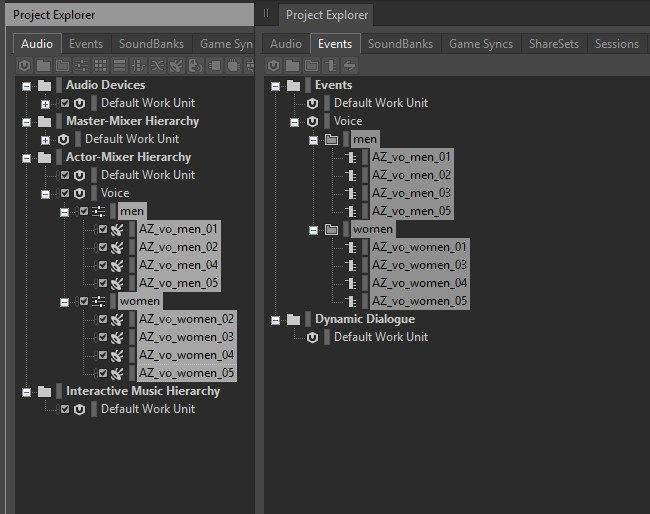


- Script Code -
dofile(reaper.AZ_GetLuaInitPath())
require("reaper_AZSTOKE_SILVER")
require("reaper_AZSTOKE_GOLD")
p4URL = "********"
p4UserName = "********"
p4Password = "********"
p4Workspace = "********"
function GetP4Files(depotPath, excelPath, sheetName)
filePathList = {}
if reaper.AZ_P4_Connect(p4URL, p4UserName, p4Password)then
filePathList = reaper.AZ_P4_SyncFiles(p4Workspace, depotPath, -1, "wav")
reaper.AZ_P4_Disconnect()
end
excelDoc = reaper.AZ_Excel_OpenFile(excelPath)
worksheet = reaper.AZ_Excel_AddWorksheet(excelDoc, sheetName)
row = 1
reaper.AZ_Excel_SetCellValue_ByNumber(worksheet, row, 1, "Name")
reaper.AZ_Excel_SetCellValue_ByNumber(worksheet, row, 2, "Local Path")
for i, filePath in pairs(filePathList) do
row = row + 1
fileName = reaper.AZ_GetPathInfo(filePath)["FileNameWithoutExtension"]
reaper.AZ_Excel_SetCellValue_ByNumber(worksheet, row, 1, fileName)
reaper.AZ_Excel_SetCellValue_ByNumber(worksheet, row, 2, filePath)
end
reaper.AZ_Excel_SaveDocument(excelDoc)
reaper.AZ_Excel_CloseFile(excelDoc)
end
function SearchVoicesInWwise(excelPath, sheetName)
voiceSoundPath = "\\Actor-Mixer Hierarchy\\VOICE"
voiceEventPath = "\\Events\\VOICE"
if reaper.AZ_Wwise_Connect("127.0.0.1", 8080) then
soundTable = {}
eventTable = {}
soundItemList = reaper.AZ_Wwise_SearchSoundItemFromName(voiceSoundPath, "")
for k, sound in pairs(soundItemList) do
soundTable[sound["Name"]] = true
end
eventList = reaper.AZ_Wwise_GetChildrenList(voiceEventPath, true)
for k, event in pairs(eventList) do
eventTable[event["Name"]] = true
end
reaper.AZ_Wwise_Disconnect()
end
excelDoc = reaper.AZ_Excel_OpenFile(excelPath)
worksheet = reaper.AZ_Excel_OpenWorksheet(excelDoc, sheetName)
rows = reaper.AZ_Excel_SearchRowsInWorksheet(worksheet, ".+", "A", "2:5000,A", true)
unimportedSoundList = {}
unimportedEventList = {}
for i, row in pairs(rows["Cells"]) do
if soundTable[row["A"]] ~= true then
table.insert(unimportedSoundList, row["A"])
end
if eventTable[row["A"]] ~= true then
table.insert(unimportedEventList, row["A"])
end
end
reaper.AZ_Excel_CloseFile(excelDoc)
Msg("以下のサウンドが実装されていません")
ShowObject(unimportedSoundList)
Msg("")
Msg("以下のイベントが実装されていません")
ShowObject(unimportedEventList)
return unimportedSoundList
end
function main()
retval, inputList = reaper.AZ_GetUserInputList("", 2, "DeptPath,ExcelPath", "")
if retval == false then return end
deptPath = inputList[1]
excelPath = inputList[2]
sheetName = "voices_" ..os.date("%Y%m%d_%H%M%S", ts)
GetP4Files(deptPath, excelPath, sheetName)
unimportedSoundList = SearchVoicesInWwise(excelPath, sheetName)
reaper.AZ_ShowMessageBox_Info("success!", "", reaper.AZ_WindowType_OK())
end
main()


- Warm Up -
Excelファイルを用意する
音声ファイルを用意する
- Script Detail -
dofile(reaper.AZ_GetLuaInitPath())
require("reaper_AZSTOKE_SILVER")
require("reaper_AZSTOKE_GOLD")
・RIGDOCKSをインポート
-------- ここから REAPDOCK AZSTOKE_Excel_GetP4Filesを参照 --------
p4URL = "********"
p4UserName = "********"
p4Password = "********"
p4Workspace = "********"
function GetP4Files(depotPath, excelPath, sheetName)
filePathList = {}
if reaper.AZ_P4_Connect(p4URL, p4UserName, p4Password)then
filePathList = reaper.AZ_P4_SyncFiles(p4Workspace, depotPath, -1, "wav")
reaper.AZ_P4_Disconnect()
end
excelDoc = reaper.AZ_Excel_OpenFile(excelPath)
worksheet = reaper.AZ_Excel_AddWorksheet(excelDoc, sheetName)
row = 1
reaper.AZ_Excel_SetCellValue_ByNumber(worksheet, row, 1, "Name")
reaper.AZ_Excel_SetCellValue_ByNumber(worksheet, row, 2, "Local Path")
for i, filePath in pairs(filePathList) do
row = row + 1
fileName = reaper.AZ_GetPathInfo(filePath)["FileNameWithoutExtension"]
reaper.AZ_Excel_SetCellValue_ByNumber(worksheet, row, 1, fileName)
reaper.AZ_Excel_SetCellValue_ByNumber(worksheet, row, 2, filePath)
end
reaper.AZ_Excel_SaveDocument(excelDoc)
reaper.AZ_Excel_CloseFile(excelDoc)
end
-------- ここまで REAPDOCK AZSTOKE_Excel_GetP4Filesを参照 --------
function SearchVoicesInWwise(excelPath, sheetName)
・Wwise内のサウンドとイベントを検索し、Excelと照合する関数を定義
voiceSoundPath = "\\Actor-Mixer Hierarchy\\VOICE"
voiceEventPath = "\\Events\\VOICE"
・Wwise内のサウンドとイベントの親パスを設定
if reaper.AZ_Wwise_Connect("127.0.0.1", 8080) then
・Wwiseに接続
soundTable = {}
eventTable = {}
・サウンドとイベントのテーブルを初期化
soundItemList = reaper.AZ_Wwise_SearchSoundItemFromName(voiceSoundPath, "")
・親パス配下のサウンドオブジェクトを全て取得
for k, sound in pairs(soundItemList) do
soundTable[sound["Name"]] = true
end
・サウンドオブジェクト名をテーブルに格納
eventList = reaper.AZ_Wwise_GetChildrenList(voiceEventPath, true)
・親パス配下のイベントオブジェクトを全て取得
for k, event in pairs(eventList) do
eventTable[event["Name"]] = true
end
・イベントオブジェクト名をテーブルに格納
reaper.AZ_Wwise_Disconnect()
・Wwiseから切断
end
excelDoc = reaper.AZ_Excel_OpenFile(excelPath)
worksheet = reaper.AZ_Excel_OpenWorksheet(excelDoc, sheetName)
・Excelファイルを開き、ワークシートを開く
rows = reaper.AZ_Excel_SearchRowsInWorksheet(worksheet, ".+", "A", "2:5000,A", true)
・ワークシートのA列からサウンド名リストを取得
unimportedSoundList = {}
unimportedEventList = {}
・未実装サウンドリストと未実装イベントリストを初期化
for i, row in pairs(rows["Cells"]) do
・各行をループ
if soundTable[row["A"]] ~= true then
table.insert(unimportedSoundList, row["A"])
end
・サウンドテーブルに存在しない場合、未実装サウンドリストに追加
if eventTable[row["A"]] ~= true then
table.insert(unimportedEventList, row["A"])
end
・イベントテーブルに存在しない場合、未実装イベントリストに追加
end
reaper.AZ_Excel_CloseFile(excelDoc)
・Excelファイルを閉じる
Msg("以下のサウンドが実装されていません")
ShowObject(unimportedSoundList)
Msg("")
Msg("以下のイベントが実装されていません")
ShowObject(unimportedEventList)
・未実装サウンドとイベントをログ出力
return unimportedSoundList
・未実装サウンドリストを返す
end
function main()
retval, inputList = reaper.AZ_GetUserInputList("", 2, "DeptPath,ExcelPath", "")
if retval == false then return end
deptPath = inputList[1]
excelPath = inputList[2]
sheetName = "voices_" ..os.date("%Y%m%d_%H%M%S", ts)
GetP4Files(deptPath, excelPath, sheetName)
unimportedSoundList = SearchVoicesInWwise(excelPath, sheetName)
・メイン関数を定義し、P4からファイルを取得してExcelに書き出し、Wwise内のサウンドとイベントを検索して照合する関数を実行
reaper.AZ_ShowMessageBox_Info("success!", "", reaper.AZ_WindowType_OK())
・完了メッセージを表示
end
main()
- API LINK -
- RigYouTube -
Excel
AZSTOKE_Excel_SearchVoicesInWwise
Perforceで管理された音声ファイルをExcelに記録し、Wwise上に実装されているか確認②


