

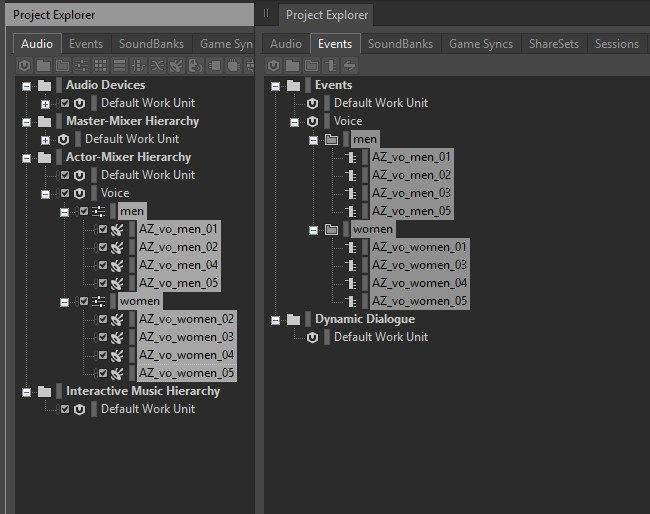


- Script Code -
dofile(reaper.AZ_GetLuaInitPath())
require("reaper_AZSTOKE_SILVER")
require("reaper_AZSTOKE_GOLD")
p4URL = "********"
p4UserName = "********"
p4Password = "********"
p4Workspace = "********"
function GetP4Files(depotPath, excelPath, sheetName)
filePathList = {}
if reaper.AZ_P4_Connect(p4URL, p4UserName, p4Password)then
filePathList = reaper.AZ_P4_SyncFiles(p4Workspace, depotPath, -1, "wav")
reaper.AZ_P4_Disconnect()
end
excelDoc = reaper.AZ_Excel_OpenFile(excelPath)
worksheet = reaper.AZ_Excel_AddWorksheet(excelDoc, sheetName)
row = 1
reaper.AZ_Excel_SetCellValue_ByNumber(worksheet, row, 1, "Name")
reaper.AZ_Excel_SetCellValue_ByNumber(worksheet, row, 2, "Local Path")
for i, filePath in pairs(filePathList) do
row = row + 1
fileName = reaper.AZ_GetPathInfo(filePath)["FileNameWithoutExtension"]
reaper.AZ_Excel_SetCellValue_ByNumber(worksheet, row, 1, fileName)
reaper.AZ_Excel_SetCellValue_ByNumber(worksheet, row, 2, filePath)
end
reaper.AZ_Excel_SaveDocument(excelDoc)
reaper.AZ_Excel_CloseFile(excelDoc)
end
function SearchVoicesInWwise(excelPath, sheetName)
voiceSoundPath = "\\Actor-Mixer Hierarchy\\VOICE"
voiceEventPath = "\\Events\\VOICE"
if reaper.AZ_Wwise_Connect("127.0.0.1", 8080) then
soundTable = {}
eventTable = {}
soundItemList = reaper.AZ_Wwise_SearchSoundItemFromName(voiceSoundPath, "")
for k, sound in pairs(soundItemList) do
soundTable[sound["Name"]] = true
end
eventList = reaper.AZ_Wwise_GetChildrenList(voiceEventPath, true)
for k, event in pairs(eventList) do
eventTable[event["Name"]] = true
end
reaper.AZ_Wwise_Disconnect()
end
excelDoc = reaper.AZ_Excel_OpenFile(excelPath)
worksheet = reaper.AZ_Excel_OpenWorksheet(excelDoc, sheetName)
rows = reaper.AZ_Excel_SearchRowsInWorksheet(worksheet, ".+", "A", "2:5000,A", true)
unimportedSoundList = {}
unimportedEventList = {}
for i, row in pairs(rows["Cells"]) do
if soundTable[row["A"]] ~= true then
table.insert(unimportedSoundList, row["A"])
end
if eventTable[row["A"]] ~= true then
table.insert(unimportedEventList, row["A"])
end
end
reaper.AZ_Excel_CloseFile(excelDoc)
Msg("以下のサウンドが実装されていません")
ShowObject(unimportedSoundList)
Msg("")
Msg("以下のイベントが実装されていません")
ShowObject(unimportedEventList)
return unimportedSoundList
end
function main()
retval, inputList = reaper.AZ_GetUserInputList("", 2, "DeptPath,ExcelPath", "")
if retval == false then return end
deptPath = inputList[1]
excelPath = inputList[2]
sheetName = "voices_" ..os.date("%Y%m%d_%H%M%S", ts)
GetP4Files(deptPath, excelPath, sheetName)
unimportedSoundList = SearchVoicesInWwise(excelPath, sheetName)
reaper.AZ_ShowMessageBox_Info("success!", "", reaper.AZ_WindowType_OK())
end
main()


- Warm Up -
Prepare an Excel file
Prepare audio files
- Script Detail -
dofile(reaper.AZ_GetLuaInitPath())
require("reaper_AZSTOKE_SILVER")
require("reaper_AZSTOKE_GOLD")
・Import RIGDOCKS
-------- ここから REAPDOCK AZSTOKE_Excel_GetP4Filesを参照 --------
p4URL = "********"
p4UserName = "********"
p4Password = "********"
p4Workspace = "********"
function GetP4Files(depotPath, excelPath, sheetName)
filePathList = {}
if reaper.AZ_P4_Connect(p4URL, p4UserName, p4Password)then
filePathList = reaper.AZ_P4_SyncFiles(p4Workspace, depotPath, -1, "wav")
reaper.AZ_P4_Disconnect()
end
excelDoc = reaper.AZ_Excel_OpenFile(excelPath)
worksheet = reaper.AZ_Excel_AddWorksheet(excelDoc, sheetName)
row = 1
reaper.AZ_Excel_SetCellValue_ByNumber(worksheet, row, 1, "Name")
reaper.AZ_Excel_SetCellValue_ByNumber(worksheet, row, 2, "Local Path")
for i, filePath in pairs(filePathList) do
row = row + 1
fileName = reaper.AZ_GetPathInfo(filePath)["FileNameWithoutExtension"]
reaper.AZ_Excel_SetCellValue_ByNumber(worksheet, row, 1, fileName)
reaper.AZ_Excel_SetCellValue_ByNumber(worksheet, row, 2, filePath)
end
reaper.AZ_Excel_SaveDocument(excelDoc)
reaper.AZ_Excel_CloseFile(excelDoc)
end
-------- ここまで REAPDOCK AZSTOKE_Excel_GetP4Filesを参照 --------
function SearchVoicesInWwise(excelPath, sheetName)
・Define the function to search sounds and events in Wwise and cross-check them with Excel
voiceSoundPath = "\\Actor-Mixer Hierarchy\\VOICE"
voiceEventPath = "\\Events\\VOICE"
・Set the parent path of the sounds and events in Wwise
if reaper.AZ_Wwise_Connect("127.0.0.1", 8080) then
・Connect to Wwise
soundTable = {}
eventTable = {}
・Initialize the sound and event tables
soundItemList = reaper.AZ_Wwise_SearchSoundItemFromName(voiceSoundPath, "")
・Get all sound objects under the parent path
for k, sound in pairs(soundItemList) do
soundTable[sound["Name"]] = true
end
・Store the sound object name in a table
eventList = reaper.AZ_Wwise_GetChildrenList(voiceEventPath, true)
・Get all event objects under the parent path
for k, event in pairs(eventList) do
eventTable[event["Name"]] = true
end
・Store the event object name in a table
reaper.AZ_Wwise_Disconnect()
・Disconnect from Wwise
end
excelDoc = reaper.AZ_Excel_OpenFile(excelPath)
worksheet = reaper.AZ_Excel_OpenWorksheet(excelDoc, sheetName)
・Open the Excel file and open the worksheet
rows = reaper.AZ_Excel_SearchRowsInWorksheet(worksheet, ".+", "A", "2:5000,A", true)
・Get the sound-name list from column A of the worksheet
unimportedSoundList = {}
unimportedEventList = {}
・Initialize the unimplemented sound list and unimplemented event list
for i, row in pairs(rows["Cells"]) do
・Loop over each row
if soundTable[row["A"]] ~= true then
table.insert(unimportedSoundList, row["A"])
end
・If not in the sound table, add it to the unimplemented sound list
if eventTable[row["A"]] ~= true then
table.insert(unimportedEventList, row["A"])
end
・If not in the event table, add it to the unimplemented event list
end
reaper.AZ_Excel_CloseFile(excelDoc)
・Close the Excel file
Msg("以下のサウンドが実装されていません")
ShowObject(unimportedSoundList)
Msg("")
Msg("以下のイベントが実装されていません")
ShowObject(unimportedEventList)
・Log the unimplemented sounds and events
return unimportedSoundList
・Return the list of unimplemented sounds
end
function main()
retval, inputList = reaper.AZ_GetUserInputList("", 2, "DeptPath,ExcelPath", "")
if retval == false then return end
deptPath = inputList[1]
excelPath = inputList[2]
sheetName = "voices_" ..os.date("%Y%m%d_%H%M%S", ts)
GetP4Files(deptPath, excelPath, sheetName)
unimportedSoundList = SearchVoicesInWwise(excelPath, sheetName)
・Define the main function and run the functions that get files from P4, write them to Excel, and search and cross-check the sounds and events in Wwise
reaper.AZ_ShowMessageBox_Info("success!", "", reaper.AZ_WindowType_OK())
・Show the completion message
end
main()
- API LINK -
- API LINK -
Excel
AZSTOKE_Excel_SearchVoicesInWwise
Record Perforce-managed audio files in Excel and verify whether they are implemented in Wwise (2)


