
[REAPDOCK-Python-] -057- [Media] A collection of scripts for recording by process - Organizing - Dividing recorded takes into OK and NG
Updated: May 20
REAPDOCK👇

[PYTHON]REAPDOCK/APIDOCK documentation update

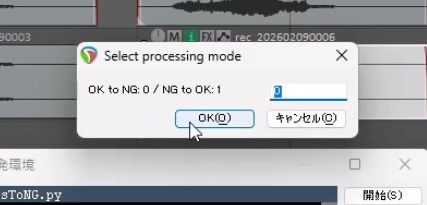


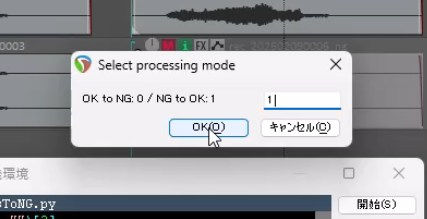

Continuing from last time, we will introduce scripts that will make recording easier.
This script filters out unwanted takes from the recorded material by marking them as "NG," and then restores the marked takes to "OK."
NG takes have "_ng" appended to the end of their names and are muted.
Using this, you can separate NG takes into a format that is easy to understand at a glance.
Also, by combining this with the script that will be introduced next time, you can avoid writing out anything that you have rejected here.
Please feel free to use it.
◆Required plan
RIGDOCKS -BRONZE-
RIGDOCKS -SILVER-
□For detailed documentation on how to generate ReaScript, see 👇
Make your work more efficient with SILVER's API !
Next time, we will release the Lua version of Reapdock.
2/18
LINK
New to Reaper/those considering subscribing to a plan
[REAPDOCK]Script documentation can be found at
[APIDOCK] Please refer to the table of contents page below for the APIs used in the script.
REAPDOCK一覧
Past blogs are here
[LOUDMATCHIFY] Part 1 : Creating Save Data - Patented Technology 003 -
[HANDAUTOMER] Part 1 : Run HANDAUTOMER on selected media and automatically set to Momentary-21LUFS -
[AUTO] Speeding up audio editing - Automatic media insertion -
[AUTO] Essential for MA production : Session organization automationPart 3
[AUTO] Essential for MA production : Session organization automation Part 2
[AUTO] Essential for MA production : Session organization automation Part 1
[MEDIA] Essential for MA production -Delete all muted media -
[MEIDA] Essential for MA production -Delete all muted media -
[FOLEY] Foley recording is essential!! -Multiple video copies during recording -
[MEDIA] Speed up sound designer! ReaScript for freely adjusting playback speed!!
[MEDIA] Essential for volume adjustment! ReaScript for freely changing the volume!!
[MEDIA] Essential for MA production : ReaScript to get frame count in 2 seconds!!
[REC] Essential for recording! : Add “ng” to the selected waveform name




![[REAPDOCK-Python-] -056- [Track] A collection of scripts for recording steps - Preparation- Prepare a recording track for each microphone](https://static.wixstatic.com/media/df9c1c_03611465f95947fcac1e821055036cea~mv2.gif/v1/fill/w_956,h_538,al_c,pstr/df9c1c_03611465f95947fcac1e821055036cea~mv2.gif)
![[REAPDOCK-Python-] -055- [Excel] Record audio files managed by Perforce into Excel and check if they are implemented in Wwise ③](https://static.wixstatic.com/media/df9c1c_37546323451e488fa2e540f36bdc665d~mv2.gif/v1/fill/w_956,h_538,al_c,pstr/df9c1c_37546323451e488fa2e540f36bdc665d~mv2.gif)
![[REAPDOCK-Python-] -003- Essential for recording! ReaScript that does a 10 minute job in 2 seconds!!](https://static.wixstatic.com/media/fc32ca_51b9d321773b4580a7995a65cedf2986~mv2.jpg/v1/fill/w_980,h_551,al_c,q_85,usm_0.66_1.00_0.01,enc_avif,quality_auto/fc32ca_51b9d321773b4580a7995a65cedf2986~mv2.jpg)