
[REAPDOCK-Python-] -065- [Transcription] Record the transcription results in a Google Sheets.
REAPDOCK👇

[ PYTHON ] REAPDOCK/APIDOCK documentation updated


This time, I'll introduce a script that uses the API for integration with Google Sheets, which was added in RIGDOCKS GOLD -1.5.0, released on June 22nd.
In the previous article on REAPDOCK, we introduced the process of extracting silent parts from an audio file and transcribing the audio portion.
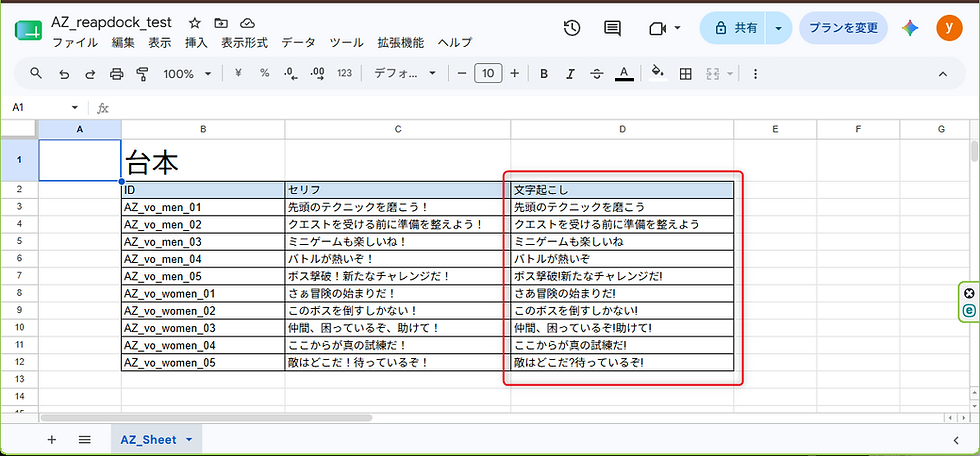
This time, we've added a process to further write the transcribed content into the Voice ID field of the script in the Google Sheets.
This script allows you to record voices and sound effects, then extract only the dialogue and instantly share it with your team by writing it to a Google Sheets.
Please give it a try.
◆Required Plan
RIGDOCKS -BRONZE-
RIGDOCKS -SILVER-
RIGDOCKS -GOLD-
□For detailed documentation on how to generate ReaScript, see below 👇
Make your work more efficient with SILVER's API !
LINK
For those who are new to Reaper or considering subscribing to a plan.
See below for the [REAPDOCK]Script documentation.
For a list of APIs used in [APIDOCK]Script, please refer to the following table of contents page.
REAPDOCK List
Past blog posts can be found here.
[LOUDMATCHIFY] Part 1 : Creating Save Data - Patented Technology 003 -
[HANDAUTOMER] Part 1 : Run HANDAUTOMER on selected media and automatically set to Momentary-21LUFS -
[AUTO] Speeding up audio editing - Automatic media insertion -
[AUTO] Essential for MA production : Session organization automationPart 3
[AUTO] Essential for MA production : Session organization automation Part 2
[AUTO] Essential for MA production : Session organization automation Part 1
[MEDIA] Essential for MA production -Delete all muted media -
[MEIDA] Essential for MA production -Delete all muted media -
[FOLEY] Foley recording is essential!! -Multiple video copies during recording -
[MEDIA] Speed up sound designer! ReaScript for freely adjusting playback speed!!
[MEDIA] Essential for volume adjustment! ReaScript for freely changing the volume!!
[MEDIA] Essential for MA production : ReaScript to get frame count in 2 seconds!!
[REC] Essential for recording! : Add “ng” to the selected waveform name




![[REAPDOCK-Python-] -064- [Transcription] Cut out the silent parts of the audio file and transcribe the audio portion.](https://static.wixstatic.com/media/df9c1c_7169649cc38748a7a15e2e485fcd4771~mv2.gif/v1/fill/w_960,h_540,al_c,pstr/df9c1c_7169649cc38748a7a15e2e485fcd4771~mv2.gif)
![[REAPDOCK-Python-] -063- [Transcription] Notify Slack of the results of the comparison with the script.](https://static.wixstatic.com/media/df9c1c_100491d435ab49698e1369582861cf29~mv2.gif/v1/fill/w_960,h_540,al_c,pstr/df9c1c_100491d435ab49698e1369582861cf29~mv2.gif)