
[REAPDOCK-Lua-] -058- [Render] A collection of scripts for recording processes - Export- Naming media and outputting to separate folders
Updated: May 20
REAPDOCK👇

[ LUA ]REAPDOCK/APIDOCK documentation update
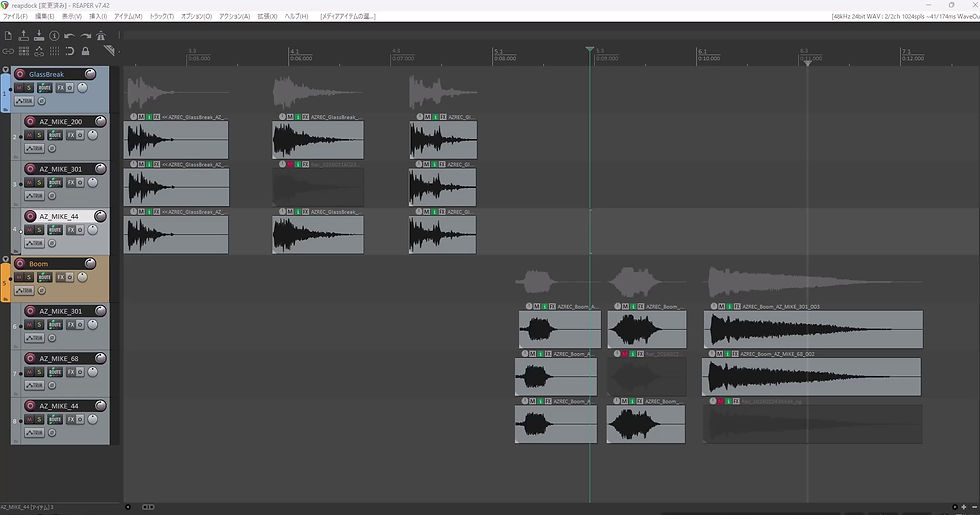


Continuing from last time, we will introduce scripts that will make recording easier.
This script renames and saves the recorded takes as files according to a specific naming convention.
It retrieves information about the recording content and microphones from the track we prepared two sessions ago, and combines this data to generate the filenames.
Additionally, the NG takes that were set previously will be automatically excluded and assigned numbers, and each track will be output in a separate folder.
This allows you to set file names in just a few seconds without any mistakes.
Please feel free to use it.
◆Required plan
RIGDOCKS -BRONZE-
RIGDOCKS -SILVER-
RIGDOCKS -GOLD-
□For detailed documentation on how to generate ReaScript, see 👇
Make your work more efficient with SILVER's API !
Next time, we will release the Python version of Reapdock.
2/25
LINK
New to Reaper/those considering subscribing to a plan
[REAPDOCK]Script documentation can be found at
[APIDOCK] Please refer to the table of contents page below for the APIs used in the script.
REAPDOCK List
Past blogs are here
[LOUDMATCHFY] LOUDMATCHIFY 2nd Edition: Executing Name-Detected Loudness
[LOUDMATCHFY] LOUDMATCHIFY 1st Edition: Save Data Generation - Patented Technology 003 -
[TALKTRON] Multilingual volume automatic adjustment function - Patented technology 00 2-
[HANDAUTOMER] -Part 2- From importing to loudness adjustment! Volume adjustment without a compressor
[FILE] Save Data Construction - Part 2 - Increasing the Flexibility of Reading Text Files -
[AUTO] Speeding up audio editing Automatic media insertion Part 1
[REC] Essential for recording! Add "ng" to the name of the selected waveform




![[REAPDOCK-Lua-] -057- [Media] A collection of scripts for recording by process - Organizing - Dividing recorded takes into OK and NG](https://static.wixstatic.com/media/4643d6_c65aa80c41484890a01e03620a54c6c7~mv2.gif/v1/fill/w_956,h_538,al_c,pstr/4643d6_c65aa80c41484890a01e03620a54c6c7~mv2.gif)
![[REAPDOCK-Lua-] -056- [Track] A collection of scripts for recording steps - Preparation- Prepare a recording track for each microphone](https://static.wixstatic.com/media/4643d6_d69ed7b666ea41c199deaeb487a88e14~mv2.gif/v1/fill/w_956,h_538,al_c,pstr/4643d6_d69ed7b666ea41c199deaeb487a88e14~mv2.gif)